8 June 2011

Youth Pastors and Unity

I just got back from a monthly gathering of youth pastors in our geographic area on the northern edge of the city of Johannesburg. We have have been meeting every month for the past 5 years – represent five to eight either different churches from vastly different congregations – and as usual spent time catching up around coffee and snacks, and devoted the bulk of the time to checking up on each other’s souls and relationship with God and family, praying for one another and spent a little time planning our next youth event. We allow youth pastors from outside our geographic area to attend to observe what we do but encourage them to start something similar in their own area. Here is a picture taken in 2009 of the youth pastors who were a part of our monthly gatherings:

We came together five years ago driven by the need to journey together as youth workers in the area, ensure that the high schools in our area are covered by at least one youth ministry and to work on getting our youth to engage on a regular basis with youth from other churches.

So not only do we meet as leaders once a month, we also meet as youth groups once a term (we rotate through each of the youth ministries so that each church gets a chance to host a gathering). At these gatherings we play together, eat together, worship together and listen to speakers who share the Word of God.

We also meet once a year as youth groups either on a weekend for a social or sports event – some times it takes the form of an end of the year dinner, or a mid-year bash. We are busy preparing to host a dance-off on the top of an exclusive residence in downtown Johannesburg in 3 weeks time. We have also presented leadership training on one occasion but that has not been a significant focus of our gatherings. Here is a pic taken at a recent sports event we held:

We also meet as youth pastors at the end of the year for a dinner together with our spouses and here we reflect on the year together, honour each other for who we area and for what we have accomplished and thank God for what He has done in and through us. Here is a pic we took at one of these gatherings in November 2009 with our family members:

In my years in youth ministry I must admit that it has never been easy to create this kind of a network among youth pastors. Everyone seems to be so busy, and more concerned about connecting within their denomination or movement’s circles that they don’t seem to see the importance of meeting together with youth pastors in their area from different church backgrounds. It takes someone who keeps the vision alive and who communicates regularly about events – and also a priority on scheduling the next meeting before we leave a meeting.

We call our gatherings as youth pastors Unity Fraternals and the gatherings as young people Unity Rallys. In essence it is a demonstration of the unity that Christ has called us to reflect in the city in which we live and minister. It is one of the highlights of my month and despite leadership transitions in our area will continue to feature in our calendars.

Here is my challenge? Are you currently engaged with the co-labourers in the corner of the vineyard where Christ has planted you? Is God calling you to start something or re-engage with youth pastors that you may have met with at one time?

3 June 2011

Leading Teens to Christ

Our Church, His People Christian Church in Johannesburg, is currently undergoing a significant transition. We are becoming a disciplemaking church. Maybe I need to clarify this a bit! We have always been a church that believes in discipleship, and are part of a movement, Every Nation Ministries, that is solidly focussed on disciplemaking (our current president, Steve Murrell, has a book due out in June 2011 entitled: Wikichurch: Making Discipleship Engaging, Empowering, and Viral), but if we are honest we have been more of an attractional church than a missional church.

Most of the people who come to faith in Jesus do so because they have been befriended by someone in the church and invited to a Sunday morning service where they have an opportunity to respond to the invitation to accept Christ as their Saviour and Lord. So we have embarked on a process of church-wide change that will equip the entire congregation with practical skills in disciplemaking so they can help their friend ENCOUNTER Jesus as Lord and Saviour, CONNECT with other believers and GROW to spiritual maturity (these are the first three steps in our faith journey – the remaining two are REACH your peers and INFLUENCE your world for Christ).

In our youth ministry, we seek to faithfully reflect the strategy used by the wider church body so that we work in alignment with the church and do not become like a planet in it’s own orbit. So while we will be launching some new strategies for peer based evangelism in the third term of 2011, I thought it worthwhile to share our currently approach to evangelism among teens.

We have a Friday night event aimed at teenagers in the youth room (a dedicated space that teens refer to as their second home – one with plenty of space to chill out, listen to music, play games like pool, table tennis and fuseball – or just hang with their friends. It is used on Sunday morning for our main weekly worship and teaching service (this is aimed at the GROW level in our faith journey).

We have designed a four-week cycle of events that is completed twice in each school term (which is about 10 weeks long). Our goal is to create a safe and inviting teen-friendly environment that Christian teens will want to invite their unsaved friends to. Our four week cycle is as follows:

Week 1: Connect Night
The first week is an event that has been with us for years – it was called Chill ‘n Connect – and basically we do nothing for the event apart from preparing a space where teens are free to hang out, play games of their own choosing and enjoy refreshments together. It gives leaders a chance to connect with teens because we are not running around preparing for or presenting the program. Sometimes we do thrown in a spontaneous time of Karaoke or a game of speed relating that helps to facilitate interaction among teens – but this is the exception and not the norm. A key factor in our four week strategy is that each week must be viewed as a step and not a program on it’s own. We make sure that we invite teens to return the next week and to bring a friend that they are seeking to disciple. The next week’s event is advertised at the beginning and the end of the night and a handout provided – as well as a text message sent out during the next week.

Week 2: Attractional Night
This night is not actually called Attractional Night – but that is what it is. We use the name of the event to advertise the night – for example: Ten Pin Bowling Night or My School’s Got Talent Night. We make it easy for teens to be able to invite their friends to the event by providing an event that teens would relate to – often with the chance of prizes being won as an added incentive. This night includes a brief but clear message about who we are as a group, what we believe in and sometimes even an introduction to the gospel – and again, a major focus of the night is ensuring that the visitors are invited to the next week’s event – the next step in their faith journey.

Week 3: God Night
That is what it is! A night that teens can expect to encounter God and we hold no punches. It includes song, dance, worship, and a clear gospel presentation with a call to respond to the gospel. While we move as a church towards a more personal disciplemaking approach we still provide opportunities for people to come and hear the gospel and have a chance to respond. In fact, my experience working among teens has taught me that when teens begin a relationship with a friend who needs Jesus and they start to build a friendship, when they get to the point of next steps they look around for a leader or an event to assist them with helping the person cross the line into the kingdom (ie. through conversion). We have in the past trained our teens in peer evangelism (that is what our REACH strategy is all about) but we don’t seem to have cracked it with seeing teens complete the whole disciplemaking process themselves. Watch this space. Before the night ends the teens are invited to return the following week for the next step in their journey.

Week 4: Go MAD Night
This is our Go Make a Difference Night and is an opportunity for teens to put their relationship with God into practise. We have done numerous service projects in the past including serving at local police or fire stations, visiting orphanages or hospitals, and are currently engaged with our teens to develop a longer term service project. We asked the question a few weeks back: “If igniteYOUTH shut down – would the community miss us?” It was a chilling realisation to conclude that they would probably not miss us – although they might even be happy that the music on Friday nights was gone. God has called us to make a different in the world in which we live and after all that is the fifth step in our faith journey: INFLUENCE your world for Jesus.

Each week we advertise the next week, but also show the cycle that we are moving through so that our core teens understand what we are trying to do. We also advertise our Sunday event on Friday nights and also advertise Friday nights during our Sunday morning events for teens who enter our ministry through church attendance on Sundays. Here is a sample of our cycle that is currently being advertised:

So what is your evangelism strategy for teens? Do you have a process that you are following to help those who have not yet trusted Christ for salvation?

Youth Pastors and Pastoral Care

On Sunday morning during a youth service, in fact, just before I got up to preach to the 50 teens in the youth room, I got called out of the room to attend to a teen in the foyer. He had told me before the service that he was worried about his mom who was going in for surgery and had been having sleepless night. He was clearly anxious and I prayed with him and made my way back into the youth room to wait for the worship to conclude before I would preach. A few minutes later I was called out again and this time was confronted by a critical situation – the young man, Neo, was clearly struggling to breath. I immediately made my way to the main sanctuary and had the media guy place a notice on the big screen that read: “A doctor is needed immediately in the youth room!” Two doctors in the congregation responded immediately and I briefed them with the little information that I had on the way up to the youth room.

As I stood over Neo’s lifeless body I could not see any signs that he was breathing and the 3 teens standing with him were trying desperately to revive him – saying repeatedly, “Come on, Neo, breath!”. I left the doctors to attend to him, made my way into the youth room where the teens were sitting down waiting for me to start preaching. I send my colleague, Mtha, out to be with the doctors and Neo while I immediately called the group to prayer for Neo. I prayed that God’s would send his resurrection life into Neo and make him live.

I concluded the prayer, with lots of Amens from the teens who were clearly worried – and started with my session of living in Victory for the morning. My assistant, Mtha, entered the room and said that as I had prayed Neo had sat up with a huge deep breath and that he was in good hands with the doctors.

Whether or not that was an instance of someone being raised from the dead is not my focus in this blog post – what is my focus is on what happened next and since then during the course of this week. Neo was taken to the hospital because one of the doctors who treated him realised that he had not just suffered an anxiety attack, but that he was experience abdominal pain. He had a pre-existing condition of stomach ulcers and the the anxiety had escalated his condition and he was needed further medical attention.

I made my way to the hospital to see Neo straight after the second service and found his friend Sipho at casualty with the news that Neo had been having more pain attacks and was in a critical condition. More of our youth arrived at the hospital concerned about his condition and after about an hour of not hearing any more I decided that I needed to make a plan to feed the teens who were not about to leave the hospital. I returned carrying Steers Burgers, chips and cokes and fed the hungry crowd. It was not until much later that afternoon that Neo was admitted to a ward and allowed visitors.

On Tuesday afternoon, I picked up a leader and some of his friends and we made our way to the hospital to visit with Neo (bringing him a copy of Philip Yancey’s book, “Where is God When It Hurts” and a card that all of us signed). Because we had used our bulk short text messaging service to update all our teens and ask them to pray that God would be with Neo, guide the doctors and bring the healing that he needed, I was able to read out messages to Neo from teens and parents who assured him of their prayers and well wishes. He had been given so much food and fruit that, before we left his bedside, he distributed most of it to his friends because he was not allowed to eat before undergoing a sonar scan. We visited with him for 2 hours and I then dropped off all the teens and his mom who had been visiting him.

We took some pics at the hospital and my colleague even made a little video that we posted on the igniteYOUTH Facebook site (tagging people in the pic and video). When I posted a comment with the photo on our Facebook page, the first person to respond was Neo from his hospital bed (it made me realise once again the power of social networking when used for the sake of the kingdom) and many people were able to comment and send him greetings. Neo wrote: “am hre i am yes its me neo recovring perfctly am brightr than the morning sun am lucky to hv god n my igniteyouth behind me i love u guys n to my mum this no one lyk u i love u n my fmly tnx god bless all of u for me loads n tons of love”.

What struck me was the number of messages that went around on Facebook about how we are a family – and that members of the group appreciate the care that they receive from leaders and from each other. One teen wrote that “We are like a family” and his was told quite sharply: “We are not LIKE a family, we ARE a family”.

Neo was discharged from hospital on Wednesday morning this week – and I was able to fetch him and his mom and drop their off at home. I spent a while with them, drinking tea and praying with them. In fact, I have just made a very early morning run to get both of them back to the hospital (Neo for a scope to check out the extent of his ulcer condition, and his mom to undergo an operation). They have both expressed sincere appreciation for all that we have done this week – and I know that we have communicated the love of Christ. His mom is a tradition healer and does not attend church – but who knows where her faith journey will lead as she has experienced the love of Christ this week!

So what have we learnt this week? Clearly, one of the critical roles of a youth pastor and the leadership of a youth ministry is the provision of pastoral care to teenagers or their families who are experience challenges like illness, medical operation or bereavement in their lives. There are times when we need to drop everything we are doing and move into crisis response mode to show the love of Jesus in as practical way as possible to those in need.

We don’t do it for this reason, but it will have a profound impact on the life of the group, bringing a sense of closeness and cohesion to the group. In fact, this Friday night, my colleague will be sharing on spiritual family and the kingdom of God and will use this situation with Neo as an example of how God has called us to demonstrate his love to people.

Are you aware of the needs of teens in your group? Have you let parents know that you need to informed about any challenges their teens face so you can respond timeously? Let’s be proactive when it situations like we faced this week and be Christ to people in their time of need.

I also learnt again the power of prayer – for who knows, if we had not prayed for Neo on Sunday – we might have lost him!

4 June 2010

Lessons For Leadership From Birding (Part 1)

Are there lessons to be learnt for leadership in a hobby like birding? Well, I have been doing some serious bird photography since the beginning of 2010 – the upgrade to a bigger zoom lens made it possible for me to get that much closer to birds! There are 953 bird species in Southern Africa and my goal is to photograph each one. So far I am sitting on 311 – you can check out my online album at this link.

I recently realised that my hobby is teaching me a great deal about life and leadership. Recently I got to share devotions with the 60 or so leaders of the church where I serve as youth pastor. I spoke about lessons for life that birding has taught me. Hey, Jesus did the same thing when we said to his followers: Consider the crows. They don’t plant or harvest. They don’t even have a storeroom or a barn. Yet, God feeds them. You are worth much more than birds. (Luke 12:24). You can download the PowerPoint presentation I used that features some of my favourite birding pics from here.

Here are some lessons that I have learnt while doing bird photography:

Lesson 1: Be Early. There is a great parable that says: The early bird gets the worm. It is true, birds feed early in the morning and as a photographer I know that I have to be up and about early in the morning to get the best shots while the sun is rising! The Message translation of 2 Corinthians 6:3 says: Don’t put it off, don’t frustrate God’s work by showing up late, throwing a question mark over everything we’re doing. When we arrive late for meetings with people we communicate that they are not important and we arrive stressed and therefore unprepared. As a soldier in the military I was trained to be not just on time, but early to be prepared for anything unexpected. So get there early so that you can lead the meeting effectively.

Consider the Birds: How are you doing in terms of being punctual? What do you need to do to improve in this area?

Lesson 2: Be Prepared. There is a parable that says: A wise owl knows how to feather his nest. The wise owl spends time preparing the nest so that when the egg is hatched it is well protected and the chicklet will grow into an owlet. As a bird photographer I had to be prepared at all times. If I have a full-memory card or flat camera battery or the wrong camera lens is on my camera, I will miss the shot. A leader must always be prepared. The Message translation of Ephesians 6:13 says: Be prepared. You’re up against far more than you can handle on your own. Take all the help you can get, every weapon God has issued, so that when it’s all over but the shouting you’ll still be on your feet. Great leaders don’t wait until the last minute to get things done. They think everything through twice and cover all the bases. A bit of thinking and preparation beforehand will ensure that we do not suffer later.

Consider the Birds: How are you doing in terms of being prepared? What is getting in your way?

Lesson 3: Be Patient. There is a parable that says: Do don’t run around like a chicken without a head. My best pictures are ones that required me to wait for just the right moment before I could get the shot. When I go running around the bush trying to cover a large amount of ground, the birds hear me coming and disappear into the thickets. When I settle down and wait for them to appear and come to me, I get the shots that I need. In life it is true that good things come to those who wait. The Message translation of Romans 5:4 says: We continue to shout our praise even when we’re hemmed in with troubles, because we know how troubles can develop passionate patience in us, and how that patience in turn forges the tempered steel of virtue, keeping us alert for whatever God will do next. God will work in our life, but it takes time and I have to surrender to what He is doing in my life. As a leader I have to be patient with people and not force their development.

Consider the Birds: How are you doing in terms of being patient? How can you be more patient with people?

Lesson 4: Be Relational - There is a parable that says: Birds of a feather flock together. I have gained immense value in learning how to identify birds by interacting with others birders in online forums where we are able to post pictures to have bird identities confirmed. I also post my pictures online so that others can benefit from what I am doing. The Message translation of Hebrews 13:16 says: Make sure you don’t take things for granted and go slack in working for the common good; share what you have with others. Great leaders are those who freely share what they create with other leaders. It frustrates me immensely to see leaders who just work in their own area and never share what they create with others. We have so much to share with our peers. Each month I get together with other youth pastors in our community and we spend time catching up about our lives and sharing what we create with one another.

Consider the Birds: How are you doing in terms of being relational? Do you intentionally hang out with, and share with, other leaders in your area?

Lesson 5: Look Good. There is parable that says: Walk proud like a peacock. Obviously God does not want us to be proud, but there is nothing wrong with looking our best and striving to be the best that we can be in every area of our lives. The Message translation of Colossians 3:12 says: So, chosen by God for this new life of love, dress in the wardrobe God picked out for you: compassion, kindness, humility, quiet strength, discipline. We must clothe ourselves with the fruit of the Spirit! After all, we represent the King of Kings and the Lord of Lords.

Consider the Birds: How are you doing in terms of looking good? What fruit of the Spirit do you need to work on?

Hey, that’s just part 1 – I will be back with some more lessons for leadership from birding!

3 June 2010

Blogging again!!!

Today I sat through an amazing workshop on effective use of social networking media and integrating Facebook, Twitter and Blogs – and to my shame, opened this blog and saw that the last time I blogged was the 4th of December. Humble apologies!!! This post gives notice that I will be back and blogging as soon as possible! Money back guarantee!

4 December 2009

4 December 2009

Approaches to Strategic Planning

I was asked this week to give someone some fresh ideas to doing strat planning with different ministry teams for a new year of ministry. I came up with the following suggestions:

1. Ten Rules of Strategic Planning
See the Ten Rules of Strategic Planning article for a set of guidelines for strategy planning.

2. SWOT Exercise
I recently led a non-profit youth ministry team through a strategic planning process and incorporated a SWOT and Transformation analysis exercise. I know SWOT is old, but I made sure that we identified Critical Success factors arising out of the analysis and then creating an Action Plan (as in, “who will do what by when”). There is a fun exercise in the handout where people look at the letters to the churches in Revelation as sample SWOT analyses. You will find a handout and a presentation for this exercise at my website – on the Strategy page – it is the first item mentioned on the page. The website is: http://www.ymresourcer.com.

3. Transformations Exercise
The Transformation exercise looks at what transformation is taking place in our ministry, what is causing it, what is hindering it and what we must do to see even greater transformation take place. You will find a handout and a presentation for this exercise on the Strategy page of my website – it is the second item mentioned on the page.

4. The Balanced Scorecard
This may be a bit too complex an exercise, but it is a 7 level strategy planning process that is ultimately focused on Performance Measurement. It is called Performance Measurement and there are links to the resources on the Strategy page of my website.

5. The 7 Practises of Ministry
I presented a session on the 7 Practises of Effective Ministry some time back at our church and believe that it could be used to guide a strategy planning session – ie. you start by identifying what is the win for the ministry; then you think through the steps you are working on to reach your strategy; then you start to narrow the focus of all that you do; etc. You will have to read the outline and look at the Improving Your Game items for each of the 7 practises to use it as a strat planning tool. It is what I used to create the original igniteYOUTH strategy when I arrived at the church that I now work in some five years ago. The resource for this is also on the Strategy page.

6. The GTD Mind Sweep
I have used the David Allen idea of a Mind Sweep (or mind dump) and we would spend about 45 minutes just getting everything possible that has been running around in our heads out and onto a couple of sheets of butcher paper. It is not a brainstorm but rather just a clearing of every incomplete loop, any ideas we have had that have not been put on the table, or acted on recently, any areas that need to be developed. We were allowed to look back and forward in dumping out thoughts – but it was not a review of event that have taken place. It should be followed up with an Action Plan session where we make a decision as to what to do with each item that was raised and complete a Who will do What by When action plan for each item.

7. Sonlife Strategy Planning Process
There is also the strat planning process I have taught to thousands of leaders across the continent of Africa with great results. It is aimed at getting a ministry to write a ministry vision with goals. They write a ministry purpose statement, identify KRA (the Key Result Areas that they need to work on to ensure they achieve their mission), write a descriptive statement of each key result (it is what that key result area looks like when it is fully functioning); then they do a SWOT analysis on each KRA (what are the strengths, weaknesses opportunities and threats that will impact on the achievements of results in each area); then create goals for each KRA (both faith goals that go in their prayer journal and work goals that go in their calendar. There is a worksheet that is created for each Key Result Area. Look at the this document for a template to use.

8. The Ground Zero Strategic Planning Process
The document Strategic Planning presents an approach to strategy planning that I have not personally used, but it looks like a comprehensive process as well as a document that have fresh ideas for different parts of the planning process.

9. The P.L.A.N. Strategy by the Crossroads Consulting Group
I came across this approach to strat planning a while back – it has 4 steps using the PLAN acronym:

A. Priorities (What we want to accomplish)
* What are the most important things we need to do in our key ministry areas to move our mission forward?
* What are things we need to do and complete in the coming year?

B. Lasting Results (Setting the targets for performance)
* What will be the results that will help us know we have accomplished our priorities?
* How will we set these targets so that they become an exercise in faith as well as effective leadership?

C. Action Strategies (Setting the stage for execution)
* How will we go about accomplishing what we want to see happen?
* What are the appropriate strategies, or best practices, that we might employ?

D. Next Steps (Making our “to do” lists)
* Who will do the work?
* When will it be accomplished?

10. The 3 Horizon Strategy by Diann Feldman
See the document 3 Horizon Strategy that has a detailed approach to strat planning.

11. The GTD Horizons of Focus
The 6 Horizons of Focus that David Allen created for the Getting Things Done approach to action management is a great resource for strategy planning.

If you have any other approaches to strategic planning – please leave a comment with some information about it so others can benefit from your experience.

3 October 2009

Getting Things Done 10: My Weekly Review

The GTD guys say that if you are not doing a weekly review you are doing dong GTD. That is true – you cannot downplay the importance of a regular weekly time (for me it takes about an hour) where you get Clean, Clear and Current. Here are the things that I do in my Weekly Review:

1. Review Planner: I look through my Mission, Roles and Goals (the three key features of my weekly planner) and ensure that I am living my mission.

2. Process Paper: I make sure that my physical inboxes are empty. I process all my receipts and file them and any other items that need to be kept in my filing system.

3. Process Notes: I work through my paper journal and review any notes that I have taken in the past week, looking for items that  need to be followed up on.

4. Review Calendar: I look back at the last week and identify calendar items that need to be moved forward to the coming week. I also fill in my weekly planner for the coming week at this time – I create calendar items for my goals for each role and also transfer items from my electronic calendar to my paper calendar at this point.

5. Mind Dump: I spend some time dumping anything that is on my mind – any thoughts that have not yet being captured and transferred to my system, I walk around and see if anything is out of place in my world, I think about each person in my family and whether there is anything that I need to follow up with them or do for them, I do the same for people in my work environment and I look at anything that needs to be done in the home – this is not the time to do it all, but to make a note of it and create next actions.

6. Review Lists: This is the critical part – I go through my Projects list and check off any completed items, create new items and check off completed projects. I go through my Next Actions list and check off anything that is completed, I look through my Agendas List and see if there is anything that I need to raise with people that is not listed, I look at my Someday/Maybe list and see whether there is an items that needs to move into my Project or Next Actions list, I look at my Waiting For list and see what I am waiting for from others and whether I need to do anything about it, and I look at my Prayer list and make sure it is up to date.

7. Review Email: I look through my email to see what action needs to be taken, I look at the Waiting For items and see what is lurking in my to Read folder. I keep my email up to date on a daily basis so it is never a major feature in my Weekly Review!

8. Preview Week: I briefly look ahead at my week to ensure I have enough down time and family time scheduled and I identify what are my weekly priorities and things I have to get done in the week.

9. Review Habits: I think through my effectiveness in handing my time and projects and I evaluate my work and rest balance and the state of my daily devotions.

10. Review Learning: I go through books that I am reading and check on progress and flag books that I need to be reading, I also burn a new CD of podcasts to listen to in my car and I look through the articles in my Read folder on my laptop.

11. Review Entertainment: I think through the movies, books, and TV shows that I want to consume in the coming week. I also look out for areas of imbalance where I am consuming too much in any of these areas.

12. Review Diet: I briefly think through whether my current diet is ensurng that I get enough fibre, vegetables and fruit, not overdoing my sugar intake and getting the vitamins I need to stay sharp and focussed.

13. Review Character: I spend some time checking on the fruit of the Spirit in my life (including love, patience, kindness, joy, etc), I evaluate my practise of spiritual gifts, and I evaluate whether I am being Christlike in my speech, attitudes and behaviours.

14. Review System: I spend a bit of time looking at the big picture of my GTD system – to check that I have all the lists  that I need and I make a note of areas that I need to improve in.

15. Enjoy Reward: This is the best part – I make myself a cup cuppachino as a reward.

Getting Things Done 9: Processing Notes

At some point I realised that I was taking copious notes in team meetings, at conferences, in church and other  places and they were not being integrated into my system. I read a few articles about how GTD applies to note taking and began to develop an approach that worked for me.

1. Using a Notebook – I spent some time in an anti-paper-electronic-zone but found that I was missing using a pen and went back to using a quality journal and gel pen that I keep with me at all times. For every team leadership event that is coming I will start a page and use it to jot down notes for the agenda items that will be covered. Then during the meeting, I will start a new page in which I will take brief notes – particularly about things that need to be followed up or commitments people have made to take action after the meetings.

2. Creating Helpful Symbols – I want to be able to glance at the page when I look back later and not have to read the whole thing – so I have developed some symbols that help me. I use a small checkbox and put letters next to it to indicate what category of action item it is. Here are some of the categories I currently use:

NA – This is for next actions that still need to be more clearly defined.

WF – This if for items that I am waiting for from people.

E – This is for errands – ie. things that I need to buy or get.

C – This is for phone calls that I need to make.

A – This is for agenda items – in GTD an agenda is something you speak to someone about.

These are written in the margins – either top/bottom or left/right margins so I can see them at a glance.

3. Other Symbols to Use - I have read about people using symbols beyond what I have mentioned here – i.e: (a) If an item is particularly important or insightful, put a star next to it. (b)  If an item requires further research or resolution, put a question mark next to it. (c) If an item requires follow-up, put a ballot box (open square) next to it. When the item is completed, I check it off. (d) If you assign a follow-up item to someone, put an open circle next to it (similar to the ballot box but a circle rather than a square) and indicate who is responsible – when the item is completed, check it off.

4. Processing the Next Actions - I then need to work through my note book and transfer these next actions to my Next Actions page – otherwise they stay hidden away in my notebook. It is important to schedule time to review your notes – ideally it should be done during your Weekly Review.

5. Completing the Next Actions - When I have attended to the item I will put a tick in the text box – both in my Next Actions list and also in my Notebook – so that when I look back at a previous meeting I don’t have  to try and figure out whether or not I have completed the next actions.

Getting Things Done 8: Horizons of Focus

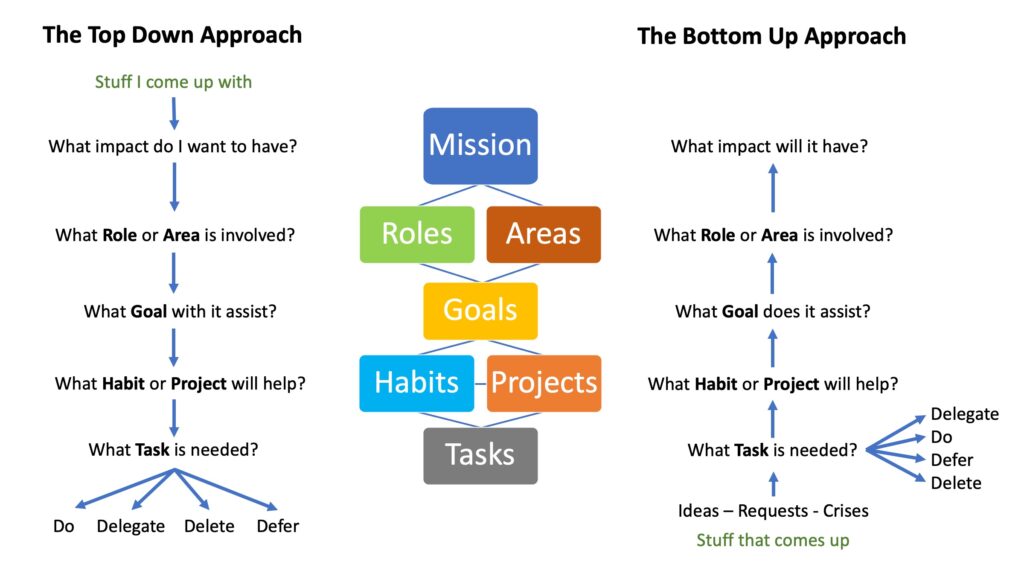
Getting Things Done is based around getting clarity about 6 levels of our life. The analogy of a plane on a run way is used. There are runway items – those are our current Actions; then the plane lifts off and move to 10,000 feet where the focus is on current Projects, then we lift to 20,000 fee and consider our areas of Responsibility, then we move to 30,000 feet and we focus on our Goals, then we move to 40,000 feet and we define our Vision, and finally at 50,000 we have the big picture view of our lives – or our purpose and our principles.

David Allen in Making it All Work describes the 6 levels like this:
Runway: Action – Current activities and action steps
10,000 feet: Projects – Tasks expected to take 12 months or less to complete
20,000 feet: Areas of Responsibility – Dfferent “hats” you wear in your life and what’s expected of you in each.
30,000 feet: Goals – Targets for yourself to complete within the next 1 – 3 years.
40,000 feet: Vision – The life you see for yourself within the next 5 – 10 years.
50,000 feet: Purpose & Principles – What you want your life to mean and how you want to be seen by others.

Here is another description of the 6 levels (starting at the top and working down):

50,000 ft is the ‘big picture’ view. Why do you exist? The primary purpose for anything provides the core definition of what its ‘word’ really is. It is the ultimate job description. In other words, your agreements at 50,000 ft. are the description of your life’s purpose. Once your 50,000 ft agreements are clear, you then start determining your agreements at the lower Horizons of Focus:

40,000 ft: Vision. What it will look, sound, feel like with successful implementation of your long term visions. This is a picture of where you want to be 3 to 5 years from now.

30,000 ft: Goals and Objectives. What do you need to accomplish within the next 1 to 2 years to make your vision happen?

20,000 ft: Areas of Focus and Responsibility. Important spheres of work and life to be maintained at standards to “keep engine running”. eg. What is the standard Health you’d like to maintain? How about your standard for your education, family life, spirituality etc. so that you can achieve your 30,000 ft and 40,000 ft goal.

10,000 ft: Projects or Outcomes you want to achieve that require more than one action and which can be completed within a year.

Runway Actions: Next physical, visible actions to take on any project or other outcome.

Trent Hamm who runs The Simple Dollar website posted the following description of the 6 horizons based on David Allen’s book, Making it All Work:

Getting Perspective
Allen looks at six different key elements of getting perspective over one’s situation. Allen’s basic argument here is that perspective helps you clearly distinguish the important from the unimportant and makes the elements of control you have over your time that much more effective.

Getting Perspective on the Runway: Next Actions
Allen starts off at the most basic place: what is your next action? In other words, if you’re sitting there ready to do something, what exactly are you going to do? Some of the time, this choice is very easy – you’ll merely engage whatever fire needs to be put out at the moment – but at other times, the choice is profound. Will you work on that PowerPoint presentation or play catch with your son in the yard? The choice becomes much less clear very quickly, and that’s why it pays to have a higher level of perspective.

Getting Perspective at Ten Thousand Feet: Projects
From the immediate action, Allen steps back a bit to look at projects, which he defines as collections of discrete actions that produce an outcome and can be completed within a year (although usually less). For example, my garden might be a project, or teaching my son how to write his letters. Usually, the projects you have on the table all have an immediate action to offer, but how important is that immediate action? It really depends on the relative importance of the project. Do I define it as more important to work on my son’s Qs or to get those tomatoes in the ground? Personally, I view the writing project as more important and would help my son before heading outside – however, perspective is important here, too. If my son wants to go outside and play in the yard, or if he’s taking a nap, that’s the perfect time for me to grab the trowel and head out back.

Getting Perspective at Twenty Thousand Feet: Areas of Focus and Responsibility
What aspects of my life need regular maintenance? That’s the question at this level – what are your areas of focus? More importantly, what areas take clear priority over the other ones – can you establish a hierarchy? I have several, with my writing and my family clearly on top of the pile. I also see the value of reflecting on this carefully, because if you truly understand the areas of responsibility in life and understand how they rank and relate to one another, it becomes much easier to just automatically prioritize smaller projects and tasks.

Getting Perspective at Thirty Thousand Feet: Goals and Objectives
Beyond your areas of responsibility are your wider goals. What do you want to achieve with your life, particularly in the next two to five years? What will you have accomplished? In many ways, I feel like I accomplished very little for the first twenty seven years of my life. I feel as though I began accomplishing things in the last three years – having children, launching The Simple Dollar, writing a book that’s already begun to turn up in unexpected places. What’s my eventual goal, the one that will probably cover the next few years of my life? I want to push some interesting changes in how people are able to access personal finance education for all ages (something you’ll be hearing about in the future but is already in the works). What Allen is driving at here is how exactly are you going to make your mark on the world? If you don’t know, it’s time to start thinking about it.

Getting Perspective at Forty Thousand Feet: Vision
So what’s beyond your life goals? Allen next moves onto what kind of life those goals, if successful, lead to. Let’s say I achieve every major goal I have set out for the next few years. Where will I be? What will come next? How much further can I reach? Do the goals I have in place for the next two to five years put me in a place that I actually want to be? If so, which of those goals are the most effective at putting me in a good place for the long haul?

Getting Perspective at Fifty Thousand Feet: Purpose and Principles
From there, we zoom out to your whole life. What principles do you live by? What is the purpose of your life? What do you hope to accomplish with your life, and are you actually setting long-term goals to get there? What do you want written as your epitaph?

Read the full Review of Making It All Work at the Simple Dollar website.

Getting Things Done 7: Next Actions vs Projects

Everyone has their own idea about the most critical part of GTD and the GTD guys themselves will probably agree that it is the Weekly Review. Hard to argue with that – because the time each week when you get to make sure you are CLEAN, CURRENT and CREATIVE is a powerful time of getting on top of all your commitments.

But in my journey it was not the weekly review that took me beyond dabbling with GTD, but setting up a Project List. Somehow I managed to implement the whole GTD system and never actually got the distinction between Next Actions and Projects.  I had all my lists set up and knew about the Project list but did not see it for what it really is. Let me describe each of these lists in detail:

1. The Next Actions List. A Next Action is a specific task or action that I need to take on any commitment that comes my way. I’m meeting with someone and I promise to send them an article to read – what do I do with that commitment? If I don’t record it somewhere in an action management system that I can trust I find that my mind keeps reminding me all the time that I have to do it – and mostly I am reminded when I can’t do anything about it – like when I am having dinner or when I am out shopping. When I should be using my mind to think about things (ie. how I can improve something or create something new), and than of things – it will keep reminding me because it suspects that I am about to drop the ball. GTD helps out in this regard but getting us to keep a Next Actions list – a list of everything we need to do! And no, this is not the same as a To Do list that we have traditionally been told to keep – with  1-2-3 or A-B-C prioritisation system. The problem there is that we keep on looking through long lists of things – most of which we can’t do because we are not in the right CONTEXT to do it. And that is where GTD helps out: our Next Actions are groups in Contexts – like @Work or @Phone or @Errands, etc. I have described this more fully in my second GTD post – check that out for more details.

2. The Project List. Now, here is why in my experience the Project List was the big kicker and what actually helped me plug a huge hole in my system. My life is not just a series of unrelated actions. I lead a ministry, I lead a team, I have responsibilities at home, etc. I am actually a project manager – and there is no way that I could manage all my projects successfully if my sole focus was on the miriad of little actions that I need to take. Plus, when I am finished one next action and I cross it off my list, how do I know what is the next thing that needs to be done? That is where the Project list comes in! A project is any commitment that requires more than one next action to complete. Planning an event is not a next action but a project which consists of a series of interrelated next actions. And the project list enables us to define and track all the items that need to be done for the each project we are moving towards completion.

A good project list will ensure that you describe what the project looks like when it is completed (this is similar to Stephen Covey’s Begin With The End in Mind principle). Then it makes us think about the next couple of steps that will move the project towards completion. I don’t always set out to list every step towards completion – I define the next 2 or 3 steps and start working on those next actions (and I make sure EVERY Next Action starts with a Verb – ie. Call for a Quote). Then I transfer those next actions from my Project List – where the whole project will be tracked – to my Next Actions list and start completing them. When I do my weekly review (or in my case mid-weekly too) I go back to the Project List and define or find more items that need to be tacked and keep transferring them to my Next Actions list. When the project is completed I can delete it from my list and move on to the next project.

When I got my mind around this distinction between Next Actions and Projects I really found that GTD started to work for me! In fact, in a future blog I will describe who these two steps are actually the first of 6 steps or Horizon’s of focus – that is a critical part of understanding how the whole system works!

Powered by WordPress and Giveaway of the Day.